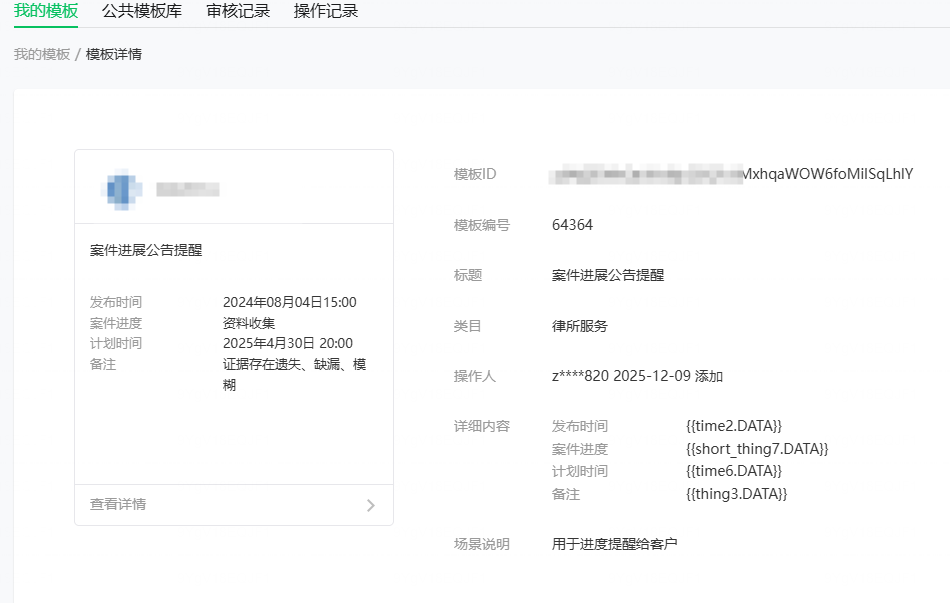
一、首先在小程序后端选好消息模版
二、小程序前端
<!-- wxml页面:一个按钮,用户点击后触发授权 -->
<button bindtap="subscribeNotice">允许接收下单通知</button>
<button bindtap="pushMsgToSelf" class="push-btn" style="margin-top:40rpx;">发送案件进度通知到微信</button>
// js逻辑页面(pages/xxx/xxx.js)
const app = getApp();
Page({
  data: {
    url: app.globalData.apiDomain.prod,
    templateId:"p0NjZENftQtUKsi8pDZQFc6MxhqaWOW6foMiISqLhlY"
  },
  // 点击按钮,触发订阅消息授权
  subscribeNotice() {
    const templateId = "p0NjZENftQtUKsi8pDZQFc6MxhqaWOW6foMiISqLhlY"; // 替换成自己的模板ID
    wx.requestSubscribeMessage({
      tmplIds: [templateId], // 数组格式,支持同时授权多个模板ID
      success: (res) => {
        console.log("授权结果:", res);
        // 授权成功的判断:返回的键是模板ID,值为 'accept'
        if (res[templateId] === 'accept') {
          wx.showToast({ title: '订阅成功', icon: 'success' });

          // ✅ 关键:授权成功后,调用自己的后端接口,把「openid」传给后端
          // 目的:让后端存下openid,后续需要推送时直接使用
          wx.request({
            url: `${this.data.url}/api/Chat/saveOpenid`,
            method: 'POST',
            data: {
              openid: 'oSMI_10AbpknLNeCbfQeTId39W9I', // 用户openid,提前获取并存好
              templateId: templateId
            },
            success: (res) => {
              console.log("后端存储成功");
            }
          })
        }
        // 用户拒绝授权
        else if (res[templateId] === 'reject') {
          wx.showToast({ title: '你已拒绝订阅,将无法收到通知', icon: 'none' });
        }
      },
      fail: (err) => {
        console.error("授权失败:", err);
        wx.showToast({ title: '订阅授权失败,请重试', icon: 'none' });
      }
    })
  },
  // ========== 新增:给自己推送测试消息 ==========
pushMsgToSelf() {
  let that = this;
  const openid = "oSMI_10AbpknLNeCbfQeTId39W9I";
  const templateId = this.data.templateId;
  if (!openid) {
    wx.showToast({ title: '请先登录', icon: 'none' });
    return;
  }
  if (this.data.isLoading) return;
  this.setData({ isLoading: true });
  // 调用后端的推送接口,给自己发消息
  wx.request({
    url: `${this.data.url}/api/Chat/pushMsg`,
    method: 'POST',
    header: {
      'content-type': 'application/x-www-form-urlencoded'
    },
    data: {
      openid: openid,
      templateId: templateId
    },
    success: (res) => {
      console.log('推送测试消息结果:', res.data);
      if (res.data.code === 1) {
        wx.showToast({ title: '消息已推送,请到微信查看', icon: 'success' });
      } else {
        wx.showToast({ title: res.data.msg, icon: 'none' });
      }
    },
    fail: () => {
      wx.showToast({ title: '网络异常,推送失败', icon: 'none' });
    },
    complete: () => {
      that.setData({ isLoading: false });
    }
  })
}
})
二、后端Thinkphp5.1
application/common.php
<?php
// +----------------------------------------------------------------------
// | ThinkPHP [ WE CAN DO IT JUST THINK ]
// +----------------------------------------------------------------------
// | Copyright (c) 2006-2016 http://thinkphp.cn All rights reserved.
// +----------------------------------------------------------------------
// | Licensed ( http://www.apache.org/licenses/LICENSE-2.0 )
// +----------------------------------------------------------------------
// | Author: 流年 <liu21st@gmail.com>
// +----------------------------------------------------------------------
// 应用公共文件
/**
 * 微信小程序获取全局接口凭证 AccessToken
 * @return string 有效的access_token
 */
function getWxAccessToken() {
    // ========== 替换成你自己的小程序 AppID 和 AppSecret ==========
    $appid = 'wx632e673fed903628';
    $secret = '2ad9d27b6763d037f347b5321054f967';
    // ==========================================================
    // 优先从缓存获取,缓存key:wx_access_token,有效期7000秒(比7200少200秒防止过期)
    $accessToken = cache('wx_access_token');
    if ($accessToken) {
        return $accessToken;
    }
    // 缓存不存在,请求微信接口获取
    $url = "https://api.weixin.qq.com/cgi-bin/token?grant_type=client_credential&appid={$appid}&secret={$secret}";
    $res = httpRequest($url, 'GET');
    $res = json_decode($res, true);
    // 判断是否获取成功
    if (isset($res['access_token']) && !empty($res['access_token'])) {
        cache('wx_access_token', $res['access_token'], 7000);
        return $res['access_token'];
    } else {
        // 记录错误日志,方便排查
        think\Log::error('获取微信AccessToken失败:'.json_encode($res));
        return false;
    }
}
/**
 * 通用curl请求方法(POST/GET),推送消息会用到
 * @param string $url 请求地址
 * @param string $method 请求方式 GET/POST
 * @param array $data POST提交的数据
 * @return bool|string
 */
function httpRequest($url, $method = 'GET', $data = []) {
    $curl = curl_init();
    curl_setopt($curl, CURLOPT_URL, $url);
    curl_setopt($curl, CURLOPT_SSL_VERIFYPEER, false);
    curl_setopt($curl, CURLOPT_SSL_VERIFYHOST, false);
    curl_setopt($curl, CURLOPT_RETURNTRANSFER, true);
    if ($method == 'POST') {
        curl_setopt($curl, CURLOPT_POST, true);
        curl_setopt($curl, CURLOPT_POSTFIELDS, json_encode($data, JSON_UNESCAPED_UNICODE));
        curl_setopt($curl, CURLOPT_HTTPHEADER, [
            'Content-Type: application/json; charset=utf-8'
        ]);
    }
    $result = curl_exec($curl);
    curl_close($curl);
    return $result;
}
控制:
<?php
namespace app\api\controller;
use think\Controller;
use think\Request;
use think\Db;
class Chat extends Controller
{
    // 存储用户openid和模板ID
    public function saveOpenid(Request $request)
    {
        $openid = trim($request->post('openid'));
        $templateId = trim($request->post('templateId'));
        $nowTime = time();
        if (empty($openid)) return json(['code' => 0, 'msg' => '用户openid不能为空']);
        if (empty($templateId)) return json(['code' => 0, 'msg' => '模板ID不能为空']);
        try {
            $res = Db::name('subscribe')->insert([
                'openid'       => $openid,
                'template_id'  => $templateId,
                'status'       => 1,
                'create_time'  => $nowTime,
                'update_time'  => $nowTime
            ], true, [
                'status'      => 1,
                'update_time' => $nowTime
            ]);
            if ($res) {
                return json(['code' => 1, 'msg' => '订阅信息存储成功']);
            } else {
                return json(['code' => 1, 'msg' => '订阅信息已存在']);
            }
        } catch (\Exception $e) {
            return json(['code' => 0, 'msg' => $e->getMessage()]);
        }
    }
    // 获取小程序openid
    public function getOpenid(Request $request)
    {
        $code = trim($request->post('code'));
        if (empty($code)) {
            return json(['code'=>0,'msg'=>'code不能为空']);
        }
        // 【替换成你的小程序AppID和AppSecret】
        $appid = 'wx632e673fed903628';
        $secret = '2ad9d27b6763d037f347b5321054f967';
        // 调用微信官方接口获取openid
        $url = "https://api.weixin.qq.com/sns/jscode2session?appid={$appid}&secret={$secret}&js_code={$code}&grant_type=authorization_code";
        $res = file_get_contents($url);
        $res = json_decode($res,true);
        if(isset($res['openid'])){
            return json(['code'=>1,'msg'=>'获取成功','data'=>$res]);
        }else{

            return json(['code'=>0,'msg'=>'获取openid失败']);
        }
    }
      /**
     * 推送案件进度订阅消息给用户
     * @param string $openid 微信用户openid
     * @param array $msgData 消息内容数组(发布时间、案件进度、计划时间、备注)
     * @return array
     */
    public function sendSubscribeMsg($openid, $msgData)
    {
        // 1. 必填配置:你的订阅消息模板ID【和授权的一模一样】
        $templateId = "p0NjZENftQtUKsi8pDZQFc6MxhqaWOW6foMiISqLhlY";
        // 2. 获取有效的AccessToken
        $accessToken = getWxAccessToken();
        if (!$accessToken) {
            $msg = '获取微信凭证失败,无法推送消息';

            return ['code' => 0, 'msg' => $msg];
        }
        // 3. 组装推送的消息体 【重中之重:字段名完全匹配你的模板,一个都不能错!】
        $sendData = [
            "touser" => $openid,          // 接收消息的用户openid
            "template_id" => $templateId, // 订阅消息模板ID
            "page" => "/pages/index/index",// 用户点击消息后跳转的小程序页面,可自定义
            "data" => [
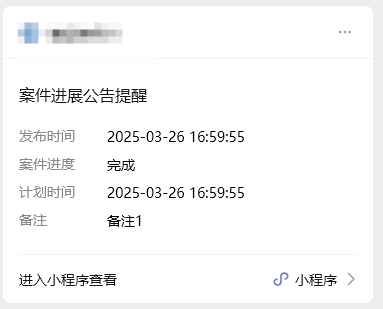
                "time2" => [
                    "value" => "2025-03-26 16:59:55" // 发布时间
                ],
                "short_thing7" => [
                    "value" => "完成" // 案件进度
                ],
                "time6" => [
                    "value" => "2025-03-26 16:59:55" // 计划时间
                ],
                "thing3" => [
                    "value" => "备注1" // 备注
                ]
            ]
        ];
        // 4. 请求微信订阅消息推送接口
        $url = "https://api.weixin.qq.com/cgi-bin/message/subscribe/send?access_token={$accessToken}";
        $res = httpRequest($url, 'POST', $sendData);
        $res = json_decode($res, true);
        // 5. 处理推送结果
        if (isset($res['errcode']) && $res['errcode'] == 0) {

            return ['code' => 1, 'msg' => '消息推送成功'];
        } else {
            $errMsg = isset($res['errmsg']) ? $res['errmsg'] : '推送失败,未知错误';

            return ['code' => 0, 'msg' => "消息推送失败:{$errMsg}"];
        }
    }
    /**
     * 业务调用入口:比如案件进度更新后,调用这个接口推送消息
     * 请求方式:POST
     * 可直接浏览器/Postman调用,也可以在你的业务代码里调用
     */
    public function pushMsg(Request $request)
    {
        // 接收参数:可以传单个openid,也可以传多个
        $openid = trim($request->post('openid'));
        if (empty($openid)) {
            return json(['code' => 0, 'msg' => '用户openid不能为空']);
        }
        // 组装你的【案件进度消息内容】,按照模板字段赋值即可
        $msgData = [
            'publish_time' => date('Y-m-d H:i:s'), // 发布时间:当前时间
            'case_progress' => '案件已受理,等待审核', // 案件进度:自定义内容
            'plan_time' => '2026-01-15 10:00:00', // 计划时间:自定义
            'remark' => '请保持手机畅通,审核结果将第一时间通知您' // 备注:自定义
        ];
        // 调用推送方法
        $result = $this->sendSubscribeMsg($openid, $msgData);
        return json($result);
    }
}
效果: