1、环境准备 安装依赖
# 更新系统
sudo dnf update -y
# 安装编译工具和依赖
sudo dnf update -y
sudo dnf groupinstall -y "Development Tools"
sudo dnf install -y gcc gcc-c++ make pcre2-devel zlib-devel openssl-devel wget tar
2、创建 nginx 运行用户(安全规范)
sudo useradd -m -s /sbin/nologin nginx

3、下载nginx-1.30.0源码
cd /opt
sudo wget https://nginx.org/download/nginx-1.30.0.tar.gz
sudo tar -zxvf nginx-1.30.0.tar.gz
cd nginx-1.30.0
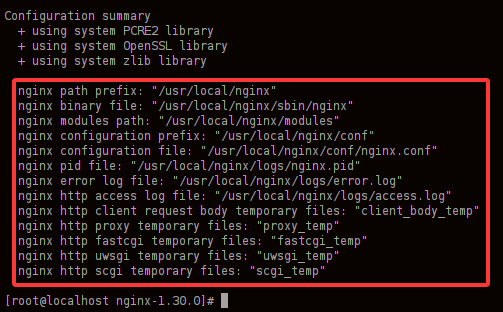
4、编译配置(常用模块和标准路径)
sudo ./configure \
--prefix=/usr/local/nginx \
--user=nginx \
--group=nginx \
--with-http_ssl_module \
--with-http_v2_module \
--with-http_realip_module \
--with-http_gzip_static_module \
--with-http_stub_status_module \
--with-stream \
--with-stream_ssl_module
5、编译并安装
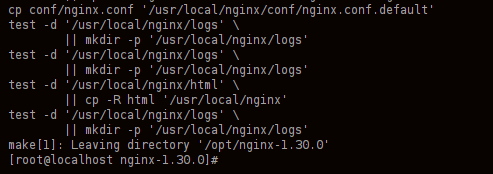
# 多核编译,加速
make -j$(nproc)
sudo make install
6、建立软链接(让 nginx 命令全局可用)
sudo ln -s /usr/local/nginx/sbin/nginx /usr/local/bin/nginx

7、验证版本
nginx -v
# 应显示:nginx version: nginx/1.30.0

8、配置 systemd 服务(开机自启、systemctl 管理)
sudo vi /etc/systemd/system/nginx.service
[Unit]
Description=nginx web server
After=network.target

[Service]
Type=forking
ExecStart=/usr/local/nginx/sbin/nginx
ExecReload=/usr/local/nginx/sbin/nginx -s reload
ExecStop=/usr/local/nginx/sbin/nginx -s stop
PrivateTmp=true

[Install]
WantedBy=multi-user.target
# 重载服务、设为开机自启、启动
sudo systemctl daemon-reload
sudo systemctl enable nginx
sudo systemctl start nginx
sudo systemctl status nginx
9、防火墙放行http/https
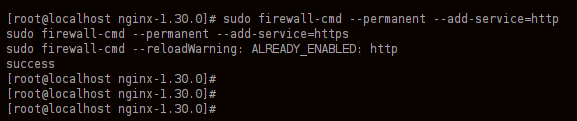
sudo firewall-cmd --permanent --add-service=http
sudo firewall-cmd --permanent --add-service=https
sudo firewall-cmd --reload
10、SELinux 放行(否则可能 403 / 无法反向代理)
sudo setsebool -P httpd_can_network_connect 1

11、访问测试
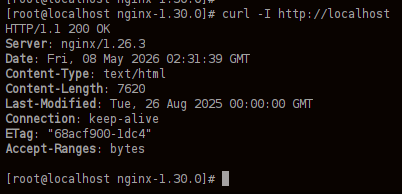
curl -I http://localhost
# 或浏览器访问服务器 IP,看到 Welcome to nginx! 即成功
如果安装完成后浏览器访问,出现403 Forbidden,解决方法如下:
SELinux 权限拦截(最常见)
网站目录 / 文件权限不对
首页文件不存在
# 1. 修复 SELinux(最关键!)
sudo chcon -R -t httpd_sys_content_t /usr/local/nginx/html
sudo chcon -R -t httpd_sys_rw_content_t /usr/local/nginx/logs
sudo setsebool -P httpd_can_network_connect 1

# 2. 修复目录权限
sudo chown -R nginx:nginx /usr/local/nginx/html
sudo chmod -R 755 /usr/local/nginx/html

# 3. 确保有首页文件
echo "Nginx 运行成功!" | sudo tee /usr/local/nginx/html/default/index.html

# 4. 重启 Nginx
sudo systemctl restart nginx